Creative Minecraft Builds for Every Skill Level
Transforming Your Minecraft World with Advanced Building Techniques
Building Epic Structures: A Guide to Minecraft Architecture
Minecraft offers endless possibilities when it comes to building structures, whether you’re crafting cozy cottages, towering castles, or futuristic cities. Exploring creative ways to design and construct these structures can be both fun and rewarding. In this guide, we’ll dive into some epic build ideas that can help you elevate your Minecraft architecture game.
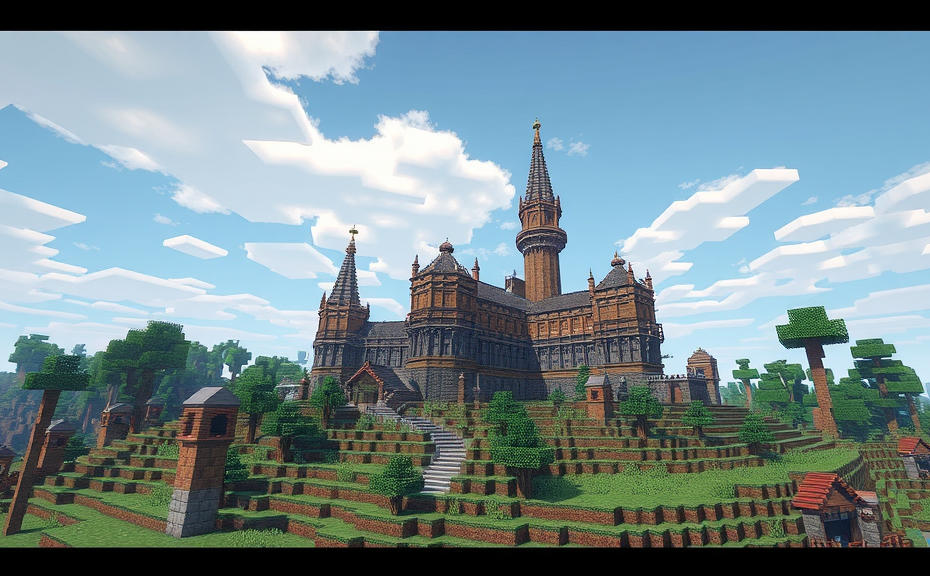
One of the most iconic structures in Minecraft is the medieval castle. To start, focus on laying out the basic layout with walls, towers, and a keep. Use blocks like cobblestone and mossy cobblestone to give it an authentic aged look. For added detail, consider adding drawbridges, gates, and even a moat filled with water. Don’t forget to incorporate features like battlements and arrow slits for that extra touch of realism.
If you’re more into fantasy, designing a floating island could be right up your alley. Start by creating a base platform using soul sand or barrier blocks, which are invisible in-game but useful for planning. Then, layer stone, dirt, and grass to form a lush, habitable environment. Add a few trees, flowers, and perhaps a small pond. To connect your island to the ground, you can use vines or build a series of bridges. Floating islands offer endless opportunities for customization and can be a real eye-catcher in any world.
For those who love modern architecture, constructing a sleek cityscape is a great challenge. Begin with a grid system for streets and avenues, then add buildings of varying heights. Utilize concrete and quartz blocks for a clean, contemporary look. Incorporate glass blocks for windows and skylines to give your city a futuristic feel. Adding streetlights, parks, and public squares can enhance the liveliness of your urban environment. Don’t hesitate to experiment with different styles—maybe even throw in a few retro elements for contrast.
Another popular build idea is the underwater city. This requires a bit more planning since you need to ensure the integrity of the structure against water pressure. Start by choosing a large cave or digging a massive trench. Build your city using materials like prismarine, dark prismarine, and sea lanterns for lighting. Incorporate coral blocks and seagrass for a vibrant aquatic atmosphere. Bridges made of glass or metal can connect different parts of the city, allowing residents to move around safely. Remember to leave spaces for air pockets so you can breathe while exploring your creation.
For something truly unique, consider building a sky city. This involves creating a floating city high above the ground, much like a floating island but on a larger scale. Start by forming a large platform using end stone or obsidian for durability. Layer with other blocks to create the ground level, then build upwards with buildings made of wool, stained glass, or concrete. Sky cities can feature intricate designs and can serve as a hub for transportation via elytra or ender pearls. Make sure to add landing pads and pathways for easy navigation.
If you enjoy historical architecture, recreating famous landmarks can be a fascinating project. Choose a landmark like the Eiffel Tower, the Colosseum, or the Taj Mahal, and scale it down to fit within the Minecraft world. Use appropriate blocks to match the original material—iron blocks for the Eiffel Tower, smooth stone for the Colosseum, and white wool for the Taj Mahal. Pay attention to details like arches, columns, and decorative elements to make your build stand out. This kind of project not only tests your architectural skills but also your creativity and patience.
Minecraft provides a vast canvas for creativity and imagination. Whether you opt for medieval castles, floating islands, modern cities, underwater realms, or historical landmarks, each build idea brings its own set of challenges and rewards. Experiment with different styles, materials, and techniques to find what best suits your vision. Happy building!
How to Design Functional and Aesthetic Villages in Minecraft
Minecraft is a world of endless possibilities where creativity meets functionality. Building villages can be one of the most rewarding experiences in the game. Not only do these villages serve practical purposes like housing NPCs and providing resources, but they can also be stunning works of art. In this guide, we’ll explore how to design functional and aesthetic villages in Minecraft, ensuring they are both beautiful and useful.
When starting a village, the first step is choosing the right location. Ideally, you want a flat area with easy access to water, wood, and other essential resources. Look for a spot near a forest or a river, which can provide both the materials needed and a scenic backdrop. Remember, the land should be relatively flat to avoid complications during construction.
Planning Your Village Layout
Before breaking ground, take some time to plan out your village layout. Sketching a rough blueprint on paper or using in-game tools like the debug stick can help visualize the space. Consider key areas such as a central plaza, housing areas, farms, and shops. Each section should flow naturally into the next, creating a cohesive design.
Central Plaza
The central plaza serves as the heart of your village. It’s where villagers gather and interact, so make it inviting. Place a large tree or two in the center, surrounded by benches and decorative elements like flower pots or small fountains. This area can also house important structures like the village bell or a statue celebrating a significant event.
Housing Areas
Villager homes should be scattered around the plaza but remain close enough for convenience. Each home should have a bed, a crafting table, and storage chests. For added aesthetics, consider varying the roof styles and colors of the houses. You could even incorporate different themes, like a rustic wooden cottage or a modern stone building, to add variety.
Farms and Resources
Farming is crucial for sustaining your village. Set up fields for wheat, carrots, potatoes, and beetroot. Surround them with fences to keep out animals. Additionally, allocate spaces for animal pens—sheep, cows, pigs, and chickens. For a touch of luxury, include a fishing pond or a small orchard nearby.
Shops and Services
To make your village more dynamic, include shops and services. Build a blacksmith where villagers can trade goods. Add a library for books and knowledge, a bakery for bread, and perhaps a butcher shop. These structures not only enhance gameplay but also give players a reason to visit and explore.
Decorative Elements
No village is complete without some decorative touches. Lanterns hanging from trees and torches lining pathways provide both light and charm. Decorative blocks like quartz, smooth stone, and stained glass can be used creatively to add color and texture. Don’t forget to include signs and banners to mark different sections of the village.
Paths and Roads
Well-designed paths and roads connect all parts of your village seamlessly. Use cobblestone or gravel for durability. For a more elegant look, consider paving stones or smooth stone slabs. Paths leading to important buildings should be wider and more ornate.
Landmarks and Structures
Adding landmarks and structures can elevate your village to the next level. A windmill, a lighthouse, or even a grand castle can serve as focal points. These structures not only look impressive but also offer strategic advantages, like higher vantage points for defense or additional storage space.
Defensive Measures
Security is vital in any village. Surround your village with walls made of sturdy materials like cobblestone or obsidian. Place watchtowers at strategic points for better surveillance. Don’t forget to set up iron golems to protect villagers from hostile mobs.
Mob Spawning Prevention
To prevent unwanted mob spawns, ensure there are no dark spots within the village boundaries. Light up all corners with torches, lanterns, or glowstone. Adding water features can also help deter mob spawning.
Tips for a Thriving Village
- Regular Maintenance: Keep your village clean and organized. Repair broken paths and replace damaged structures.
- Expand Gradually: Start small and expand as needed. This approach helps manage resources and ensures a balanced growth.
- Engage Villagers: Trade with villagers, offer them jobs, and ensure they have everything they need to thrive.
- Keep Up With Updates: Stay informed about new updates and features in Minecraft. This knowledge can inspire new ideas and improvements.
Designing a functional and aesthetic village in Minecraft is a rewarding challenge. By carefully planning each element and incorporating decorative touches, you can create a vibrant community that both looks stunning and serves its purpose well. Whether you’re a seasoned builder or just starting out, these tips will help you craft a village that stands out in the vast Minecraft world.
Mastering Minecraft Redstone: Automating Your Builds for Fun and Efficiency
Minecraft is more than just a game; it’s a platform for creativity and innovation. One of the most fascinating aspects of Minecraft is its redstone system, which allows players to create complex mechanisms and automate their builds. Whether you’re looking to streamline your base, create intricate puzzles, or simply add some flair to your world, mastering redstone can take your Minecraft experience to the next level.
Redstone is essentially Minecraft’s version of electricity, allowing for the creation of circuits and automated devices. By understanding how redstone works, you can build contraptions that perform tasks automatically, saving you time and effort. From simple doors that open when you approach to elaborate farms that harvest crops without any player intervention, the possibilities are endless.
Understanding the Basics
To get started with redstone, you need to familiarize yourself with the basic components:
- Redstone Dust: Acts like wires, conducting power across blocks.
- Redstone Torches: Provide a constant power source.
- Redstone Repeaters: Allow you to extend the range of redstone signals.
- Redstone Comparators: Compare the strength of two redstone signals.
- Buttons and Levers: Trigger redstone signals.
- Pressure Plates: Trigger redstone signals when stepped on.
Building Simple Circuits
Once you know the basics, start by building simple redstone circuits. For example, a basic door that opens when you step on a pressure plate. Place the pressure plate in front of the door, connect it to a redstone torch, and run redstone dust to the door mechanism. When you step on the plate, the torch turns off, releasing the door.
Advanced Techniques
As you become more comfortable with redstone, you can start incorporating more advanced techniques:
- Timers: Create redstone circuits that trigger after a set delay using repeaters.
- Latches: Build memory units that hold a state until changed manually or by another signal.
- Comparators: Use them to detect changes in inventories or block states.
For instance, a timer can be used to control the speed of a conveyor belt farm. By adjusting the delay between each pulse, you can fine-tune the efficiency of your farm.
Creating Automated Farms
One of the most practical applications of redstone is in farming. Automated farms can save you time and resources, especially in survival mode. Here’s a basic setup for an automated wheat farm:
- Build a large area where crops can grow.
- Place hoppers and chests below the crops to collect harvested items.
- Set up pistons to push harvested crops into the hoppers.
- Use redstone torches and repeaters to create a circuit that triggers the pistons when the crops are fully grown.
This setup ensures that your farm runs continuously, harvesting crops as soon as they’re ready.
Adding Security Features
Security is another area where redstone shines. You can create complex locking mechanisms for your base or treasure rooms:
- Lockable Doors: Use levers or buttons to control access.
- Traps: Set up redstone traps that activate when intruders enter a specific area.
- Alarm Systems: Install alarms that go off when someone tries to break in.
For example, a lockable door can be designed to require multiple inputs to open, making it much harder for unauthorized users to gain entry.
Decorative Applications
Redstone isn’t just about functionality; it can also enhance the aesthetics of your builds:
- Lights: Use redstone lamps to light up areas of your base.
- Animated Displays: Create moving signs or banners using pistons and redstone.
- Interactive Art: Build interactive art pieces that change based on player interaction.
An animated sign, for instance, can display different messages depending on whether a player is present or not, adding a dynamic element to your world.
Putting It All Together
Now that you’ve learned the fundamentals of redstone, try combining these elements to create something truly unique. For example, a fully automated base that handles everything from food production to security. Start small and gradually expand your creations as you become more proficient.
Remember, the key to mastering redstone is practice. Experiment with different designs, and don’t be afraid to fail. Each attempt brings you one step closer to understanding how redstone works and how you can leverage it to enhance your Minecraft experience.
Whether you’re building a functional farm, setting up a secure base, or crafting intricate displays, redstone offers endless opportunities to express your creativity. So dive in, experiment, and see where your imagination takes you!
Conclusion
Exploring the vast world of Minecraft offers endless possibilities, whether you’re a beginner or a seasoned pro. From crafting simple yet charming builds to mastering intricate redstone mechanisms, each project can transform your game experience. Whether you’re designing functional villages or awe-inspiring structures, the key lies in combining creativity with technique. Advanced building methods not only elevate the visual appeal but also enhance functionality, making every block placement count. As you dive deeper into redstone engineering, you unlock new dimensions of automation and efficiency. Each step forward in your Minecraft journey opens up exciting new ideas and challenges. So, keep experimenting, learning, and most importantly, having fun. Remember, the true essence of Minecraft is in the creation itself—let your imagination run wild and watch your virtual world come alive.